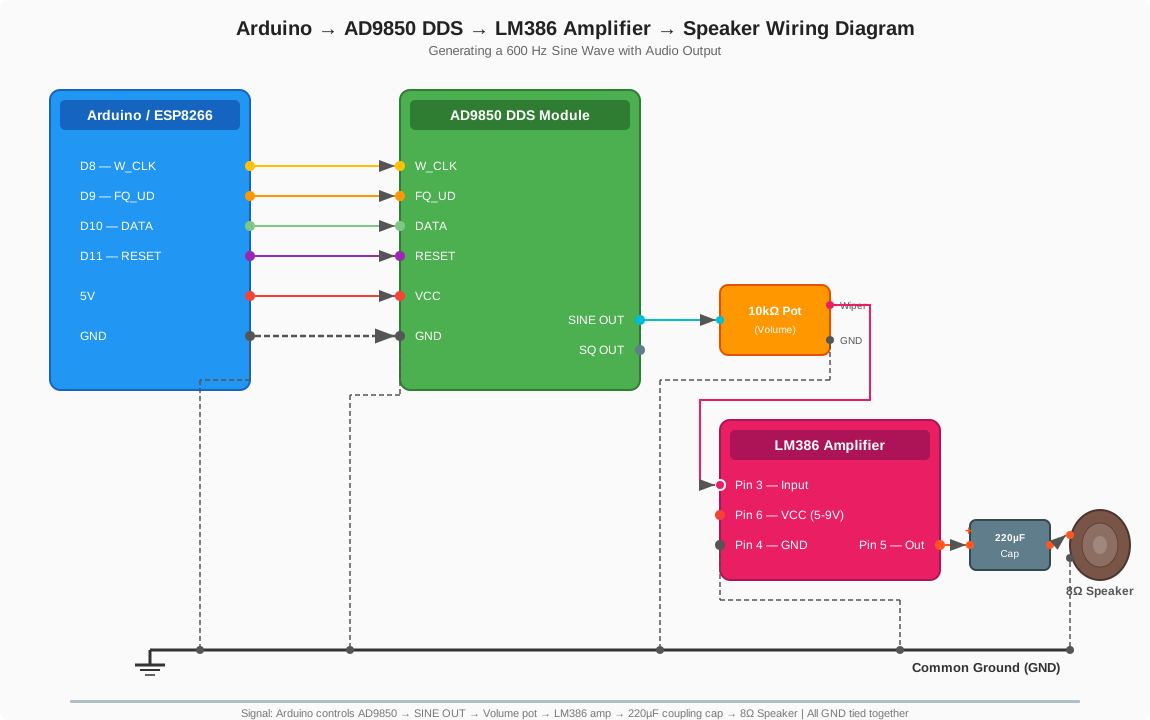
1. AD9850 Overview & Frequency Range
The AD9850 is a CMOS Direct Digital Synthesizer (DDS) chip capable of generating sine and square wave outputs.
Frequency Range (with internal 125 MHz clock)
- Output range: 0 Hz to ~62.5 MHz (Nyquist limit — half the clock frequency)
- Practical usable range: 0 to 40 MHz, as output amplitude and signal purity degrade near the Nyquist limit
- Frequency resolution: ~0.0291 Hz (125 MHz / 2³²) thanks to the 32-bit tuning word
- Can accept an external clock up to 125 MHz
- Outputs both a sine wave (via internal DAC) and a square wave (via comparator)
Practical Considerations
- Output amplitude rolls off at higher frequencies due to the sin(x)/x response of the DAC.
- Above ~40 MHz, harmonic distortion increases and amplitude drops.
- For clean output above 40 MHz, additional filtering is needed.
- The square wave output can go up to the full clock frequency.
2. Generating 600 Hz
Tuning Word Calculation
The 32-bit frequency tuning word is calculated as:
Tuning Word = (Desired Frequency × 2³²) / Clock Frequency
For 600 Hz with a 125 MHz clock:
Tuning Word = (600 × 4,294,967,296) / 125,000,000 = 20,640 (0x000050A0)
Wiring to a Microcontroller (Arduino / ESP8266)
You need 3 control pins plus reset:
| AD9850 Pin | Microcontroller Pin | Function |
|---|---|---|
| W_CLK | D8 | Word clock (data shift) |
| FQ_UD | D9 | Frequency update (latch) |
| DATA (D7) | D10 | Serial data in |
| RESET | D11 | Module reset |
| VCC | 5V / 3.3V | Power supply |
| GND | GND | Common ground |
Arduino Code
#define W_CLK 8
#define FQ_UD 9
#define DATA  10
#define RESET 11

void setup() {
  pinMode(W_CLK, OUTPUT);
  pinMode(FQ_UD, OUTPUT);
  pinMode(DATA, OUTPUT);
  pinMode(RESET, OUTPUT);

  // Pulse reset
  digitalWrite(RESET, HIGH);
  delay(1);
  digitalWrite(RESET, LOW);

  // Pulse FQ_UD to initialize
  digitalWrite(FQ_UD, HIGH);
  delay(1);
  digitalWrite(FQ_UD, LOW);

  sendFrequency(600.0);
}

void loop() {}

void sendFrequency(double freq) {
  uint32_t tuningWord = (freq * 4294967296.0) / 125000000.0;

  // Send 32-bit tuning word, LSB first
  for (int i = 0; i < 32; i++) {
    digitalWrite(DATA, (tuningWord >> i) & 0x01);
    digitalWrite(W_CLK, HIGH);
    digitalWrite(W_CLK, LOW);
  }

  // Send 8 bits of phase/control (all zeros for normal operation)
  for (int i = 0; i < 8; i++) {
    digitalWrite(DATA, 0);
    digitalWrite(W_CLK, HIGH);
    digitalWrite(W_CLK, LOW);
  }

  // Pulse FQ_UD to latch the frequency
  digitalWrite(FQ_UD, HIGH);
  digitalWrite(FQ_UD, LOW);
}
Output
- SINE OUT — a 600 Hz sine wave (~1V peak-to-peak, may need amplification)
- SQ OUT — a 600 Hz square wave
At 600 Hz the output should be very clean with minimal filtering needed.
3. Connecting a Speaker
You can’t connect a speaker directly to the AD9850 output — the signal is too weak and the chip can’t drive a speaker load. You need an amplifier stage in between.
Signal Chain
AD9850 SINE OUT → 10kΩ Pot (volume) → LM386 Amp → 220µF Cap → 8Ω Speaker
Option A: LM386 Audio Amplifier
| Connection | Details |
|---|---|
| AD9850 SINE OUT | → 10kΩ potentiometer (outer leg) |
| Pot wiper (middle pin) | → LM386 input (pin 3) |
| Pot other outer leg | → GND |
| LM386 GND (pin 4) | → Common ground with AD9850 |
| LM386 output (pin 5) | → 220µF cap (+) → Speaker (+) |
| Speaker (−) | → GND |
| LM386 VCC (pin 6) | → 5V–9V supply |
Most pre-built LM386 modules include the output capacitor and have screw terminals for audio in, power, and speaker out.
Option B: PAM8403 Module
A tiny class-D amp board — runs on 5V, drives 3W into a small speaker. Feed the AD9850 sine output into the audio input.
Tips
- At 600 Hz the sine wave sounds like a clear tone, similar to a dial tone.
- Use an 8Ω speaker (standard small speaker).
- Keep the AD9850 and amplifier on the same ground.
- If you hear buzzing or noise, add a 100nF capacitor between the AD9850 sine output and GND to filter high-frequency noise.
- The potentiometer is optional but handy — 600 Hz at full volume gets loud quickly.